I recently re-designed how I run, deploy, and generally manage docker-compose services in a way that works really well in my homelab (and, honestly, could probably work for a small company), all based around a tool called komodo and a custom CLI. Here’s what I did.
Background: The gang re-invents the wheel↑
I have a small home lab that I blog about occasionally. It runs Proxmox with VMs and LXC containers, and the VMs generally run Docker, but there’s the occasional traditional Linux service install (like postgres, which has its own VM).

From maintaining docker-compose files…↑
A likely relatable story for some: I’ve long since maintained docker-compose files in a repository and simply cloned it on the correct VM(s) to deploy services. That works fine.
Naturally, as services grew over the years, I added dockge to manage some of it.
But it was still hard to keep track, so I’ve added a small yaml file that just lists all services and some metadata (say, a description).
…to inventing dev tooling…↑
I’ve then added a small CLI application (named Heidrun) that could generate templates for these services from this data, for instance a run.sh file that made sure any external mounts were present.
But there were still several manual steps involved: A HTTP service would need a DNS entry, and the service would need TLS, which we can provide via traefik. So I added more templates that generate a setup.md that simply told me what to do. It also generated the de-facto documentation for a lot of it. It’s a one-time setup step, so why automate that… right?
But of course, copy-pasting this got old fast, so i added CLI commands to automatically merge these changes into e.g. the traefik config eventually.
By this time, I’ve added a lot more properties:
gitea: auth: configured: true typ: oicd data: conf: chown: true dirs: - /opt/gitea/data mount-nfs: false description: Self-hosted git server developer: github-url: https://github.com/go-gitea/gitea docker: env-file: null file: docker-compose.yaml hooks: null is-abandoned: false nodes: - hostname: gaia.lan ip: # ... shortened for your convinience owner: gid: #... service: gitea service-type: docker-compose sql: null traefik: host: git. # ... this one is funny, since it actually also needs a TCP router which I have, but never modelled in this config ports: - 443 use-ngrok: falseNOTE
Worth noting we’re talking about a couple of years of slow evolution here.
…to almost re-inventing Kubernetes↑
Naturally, I also needed to pull the changes on the respective servers (by this point all the run.sh script had sentinels that avoided me accidentally running it on the wrong machine and breaking the network routing). SSH/Git keys helped, but I’ve also added a few shell scripts that would pull from git, restart the compose stacks and so on.
Other things got annoying: Cold starts of the bigger VMs that (by virtue of copy-pasting the node name) ran a lot of services could take a long time. It would be nice to distribute the load better. Biggest bottleneck was I/O.

A cold start after a reboot.
Since I was halfway to a deployment system with my generated script jungle, I came up with this idea of adding an agent to the servers and add worker nodes to it…
This is where I finally stopped myself.
Re-inventing the wheel is ok(-ish)↑
Before people start foaming at the mouth: I knew exactly what I was doing (and, by proxy, where to stop).
On shaving yaks↑
A big part of running a homelab for me is to learn and experiment - it’s OK to yak shave a bit.

Yak Shaving.
(Credit: David Revoy)
It’s fun (and educational) to do things from scratch sometimes. May I point you to my distributed systems series while we’re at it?
I intentionally don’t run Kubernetes, partially because I don’t particularly enjoy working with it, partially because I already use it at work, and partially because I don’t think it would add a lot for me (or, frankly, most businesses). The same comment largely applies to terraform and ansible.
It’s also an enormous amount of setup that has little overlap with my current template code-gen monstrosity, which, despite its insanity, works really well and has a few advantages I’ll get to shortly (you could make a point for it having some overlap with helm, but I digress).
I also enjoy writing code. I don’t get to do that as often as I like, and I dislike coding challenges for the sake of it, yet don’t have enough free time for a fully-fledged OSS project (although I do maintain a few niche ones). And by not doing it at work, I don’t have to view code as a liability as much.
You know what, I like my CLI↑
So, I decided that I wanted to actually re-use heidrun. It’s a surprisingly convinient tool: While it’s not written in Rust, doesn’t use GraphQL, and doesn’t even cost $20,000/mo to run on AWS, it is a very convinient wrapper arround small, but dense dataset. Think of it as a local CRUD app with validation and automation built in, where the persistence layer is various yaml and toml files that describe infrastructure.
For instance, you can query the services.yaml:
❯ uv run heidrun list abandonedbar-assistantjeluNow, granted, you can do this with yq:
❯ cat services.yaml | yq '.services | to_entries | map(select(.value.is-abandoned == true)) | .[].key'bar-assistantjeluBut as much as I enjoy the jq/yq syntax, it’s not something I find very convinient. Maybe it even saves me some time!

Referenced by me at least once a week.
(Credit: xkcd)
Also, can yq find me a free port on a host that has multiple services?
uv run heidrun list free-port --host gaia.lan9002…probably, if you group all hostnames and ports and add 1.
But my point here is: It does things for me I find useful and I’d like to keep using them them.
It’s also decent abstraction, since changing code gen is all that’s required to migrate IaC logic (say, from SSH deployments to a convinient, open source tool…).
What I don’t want to keep (or write) is all the other stuff that comes along with it - the actual deployment, the agents, the monitoring, the background tasks, the updater, the secrets management etc.
And I found just the tool to do all that, all while being fully configurable via git controlled files (and hence, a prime candidate for heidrun).
Running Komodo↑
It’s called komodo and it’s awesome. It’s:
[…] a web app to provide structure for managing your servers, builds, deployments, and automated procedures.
It’s fully self hosted and licensed as GPLv3 and works with a central server + agents on worker nodes.
Components↑
Komodo can be configured via toml files or the UI. It does have a heavy emphasis on declarative infrastructure, so what I’ll be doing.
NOTE
Everything I describe here exists in a dev and prod variant. Yes, I have a dev environment in my home lab.
The example I’m using here is homepage.dev , which is my home lab’s landing page.
Stack: What & Where↑
At the heart of it all, we have a stack per service that controls how to run the actual thing we want to host and where.
[[stack]]name = "homepage-dev"description = "A modern, fully static, fast, secure fully proxied, highly customizable application dashboard"tags = ["dev"][stack.config]server = "worker-dev-001"auto_update = truelinked_repo = "my-config-repo"run_directory = "docker/homepage"file_paths = ["docker-compose.yaml"]pre_deploy.command = """ ./pre-deploy.sh"""environment = """HOMEPAGE_VAR_GITEA_TOKEN = [[HOMEPAGE_VAR_GITEA_TOKEN]]I’ve generated a pre-deploy.sh script that can do setup (like copying config files). It’s driven by an existing setting (called hooks) in my services.yaml:
homepage: # ... docker: env-file: .env file: docker-compose.yaml hooks: pre: - cp $DIR/config/* /srv/homepage/configSomewhat driving home the point that a small CLI can be a good abstraction.
The rest of the settings are pretty self-explanatory: Tags and descriptions are metadata; we tell it to run on a specific server and to pull from a specific git repo, both components we’ll define in a second.
sync-service: What stacks to create↑
Since we can’t just copy the toml into the UI (like you can with json in datadog, for instance), we also need to create a sync.
Komodo is able to create, update, delete, and deploy resources declared in TOML files by diffing them against the existing resources, and apply updates based on the diffs.
This sync-service refers to the stacks from earlier:
[[resource_sync]]name = "services-dev"description = "Main deployment sync for services."tags = ["dev"][resource_sync.config]linked_repo = "my-config-repo"resource_path = ["docker/homepage/komodo_deployment.dev.toml"]And will effectively create the actual stacks. heidrun’s templating just fills in the resource_path array.
service-sync: The starting point↑
Since we need to tell Komodo to sync our resources from git, but we also create all these resources based on files in that very git repo, we need a starting point for the whole deployment chain.
We could skip this step and just maintain services-dev via ClickOps, but I don’t like that:
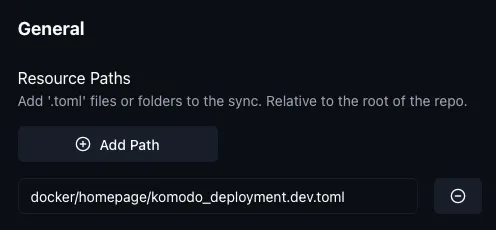
So, this non-IAC component simply makes sure the actual sync-service from above is up to date, e.g. if we added a new service to it, we just need to refresh this for it to propagate:
[[resource_sync]]name = "service-sync-dev"description = "Creates the actual service-syncs"tags = ["dev"][resource_sync.config]linked_repo = "my-config-repo"resource_path = [ "docker/komodo_services.dev.toml"]Which isn’t too bad.
NOTE
I’m not sure if this is truly necessary or if there’s a better way to start the chain, but it’s not a ton of extra work.
Repositories↑
All this is driven by git repositories. I re-use the same git repository where everything already lives.
These can also be maintained as a config:
[[repo]]name = "my-config-repo"[repo.config]server = "Local"git_provider = "git.example.org"git_account = "christian"repo = "christian/my-config-repo"Workers↑
All this needs to actually run somewhere. Note how the stack defined a worker as e.g. worker-dev-001? Yep, also a toml file:
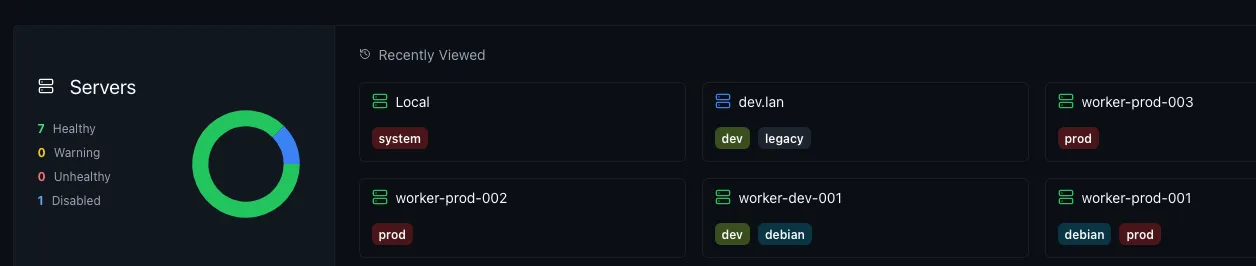
[[server]]name = "worker-dev-001"tags = ["dev", "debian"][server.config]address = "https://192.168.1.197:8120"enabled = trueEven comes with neat monitoring:
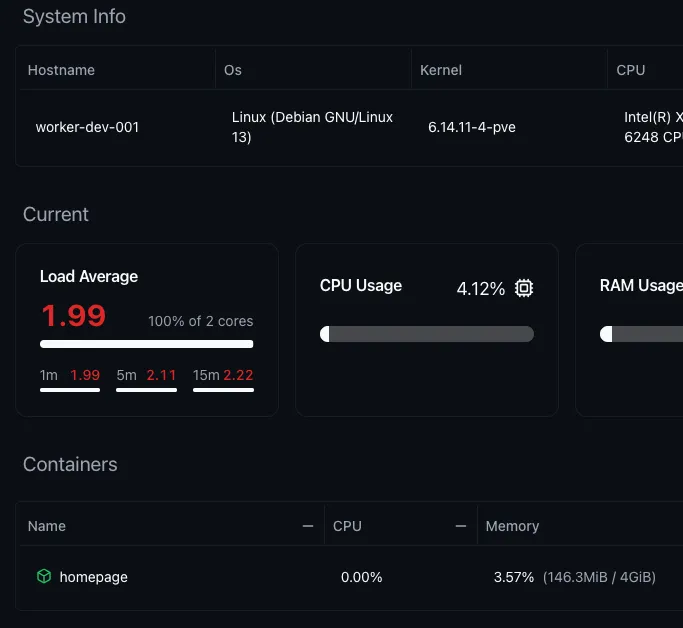
This works for any worker running the periphery agent. I run my monitoring largely with Grafana, but it’s still nice to have (even though I do think the LXC messes with the load average numbers).
Proxmox↑
This is where we break out of pure komodo, since we still need to create these workers: The actual worker are unpriviledged Proxmox LXC (containers).
IMPORTANT
Note from 2025-12-29:
I’ve since migrated from LXC to VMs for a few reasons:
- Running unpriviledged LXC requires custom UID/GID mapping to access mount points (which gets hard to reason about)
- Messes with system reporting: Things like
CAdvisorwon’t produce useful data, since they don’t fully isolatecgroupsand have access to the host’s/sysand/proc - Allegedly, Docker 29 broke Docker on LXC for some people, even though I can’t confirm this.
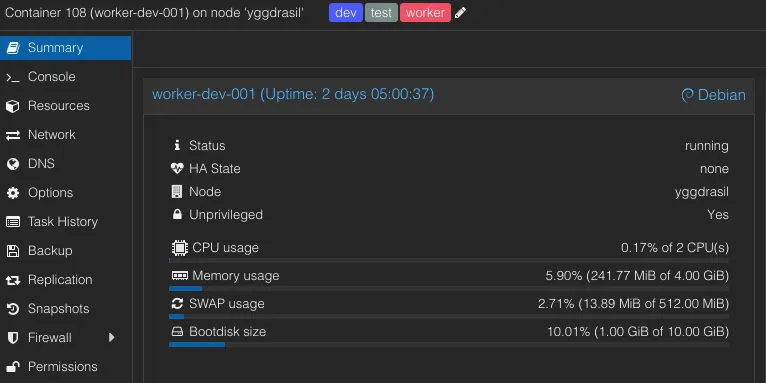
Said container is based on a template, which makes it reasonably easy to scale up and down nodes (albeit not as easy as with K8s). Each container simply runs debian + docker, as well as the periphery agent.
We can also tie them to Proxmox resource pools. Naturally, you could maintain these LXCs via ansible, terraform, or others. It’s turtles all the way down.

Containers are more lightweight than VMs for this and make networking easier and visible in the GUI (namely static IP assignments and VLANs). You could also run VMs.
Putting it all together↑
I felt the need to call this out again: I still use my bikeshedd-y CLI from earlier to generate all these files. I just don’t roll my own deployment and management services anymore.
For instance, this is the template for the sync:
[[resource_sync]]name = "services-{{env}}"description = "Main deployment sync for services."tags = ["{{env}}"][resource_sync.config]linked_repo = "my-config-repo"resource_path = [{% for service in services -%} "docker/{{service}}/komodo_deployment.{{env}}.toml"{% endfor -%}]Which also means: I still use the trusty, vendor-agnostic, absolute source-of-truth, services.yaml from earlier.
A graph↑
Aimed with this knowledge, we can try to visualize this (if you squint hard enough, this is K8s shaped). Since every toml here can have an associated sync, I simplified it a little bit.
This looks a bit convoluted, but I like diagrams and I promise it’s pretty simple once you see it in action.
See it in action↑
Real world example: After rolling out this system, I deprecated dockge and wanted to update homepage.dev to reflect that.
Deprecate a service↑
First, I use heidrun to disable the service:
uv run heidrun config abandon --name dockge --write-to-system-confThis does 2 things:
- Tombstones the service in the
services.yml - Removes its DNS and
traefik/TLS configurations as well as from the homepage config file
Because of the tombstone, the following command:
uv run heidrun --write --force --service dockge generate allWill now largely be a no-op, and also exclude it from generating any further config files.
We can also discover abandoned services:
❯ uv run heidrun list abandoneddockgeI use this frequently while protoyping and testing tools where I haven’t quite decided on what tool to use. I’m a data hoarder and don’t like deleting stuff (or walking back my git history).
But the service still shows up on the actual homepage, since we haven’t deployed anything yet.
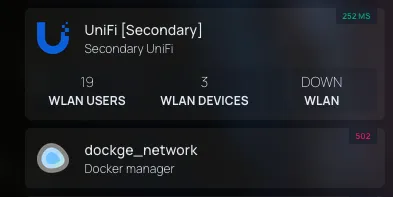
We could also straight up delete it:
❯ uv run heidrun config delete --name dockgeWARNING | heidrun:delete:349 - ⚠️ Deleting service 'dockge'. Type 'DELETE' to confirm:DELETEINFO | heidrun:delete:356 - Writing system config for 'dockge'DEBUG | heidrun:delete:362 - Writing new config to 'docker'INFO | heidrun:delete:368 - Service 'dockge' deleted.The result stays the same: All this does is change the services.yaml, the traefik and DNS config, and generates/updates .sh and komodo toml files.
Edit a service↑
Similarly, we can also use the CLI (or edit the services.yaml) to edit a service, e.g. to change its worker node, which would update the komodo config files:
--- a/docker/homepage/komodo_deployment.prod.toml+++ b/docker/homepage/komodo_deployment.prod.toml@@ -4,7 +4,7 @@ name = "homepage-prod" description = "None" tags = ["prod"] [stack.config]-server = "gaia.lan"+server = "worker-prod-001" auto_update = true linked_repo = "my-config-repo" run_directory = "docker/homepage"@@ -36,4 +36,4 @@HOMEPAGE_VAR_OCTOPRINT_TOKEN = [[HOMEPAGE_VAR_OCTOPRINT_TOKEN]]-"""+"""INFO
The [[HOMEPAGE_VAR_OCTOPRINT_TOKEN]]syntax is for secrets, which I’m intentionally glossing over in this article
Before deploying anything, here’s how the komodo UI looks:
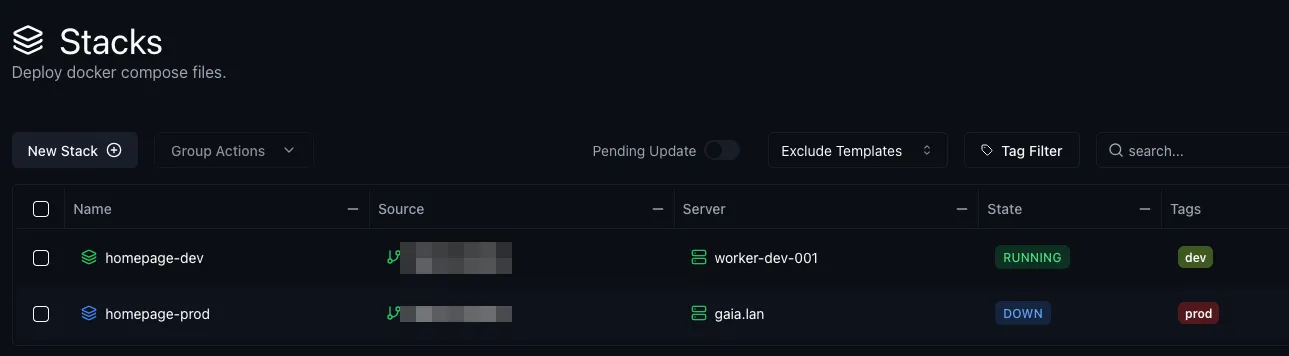
So now, all we need to push this to git to deploy everything.
Deploy↑
In the Komodo UI, we can see that the sync has now discovered a change:
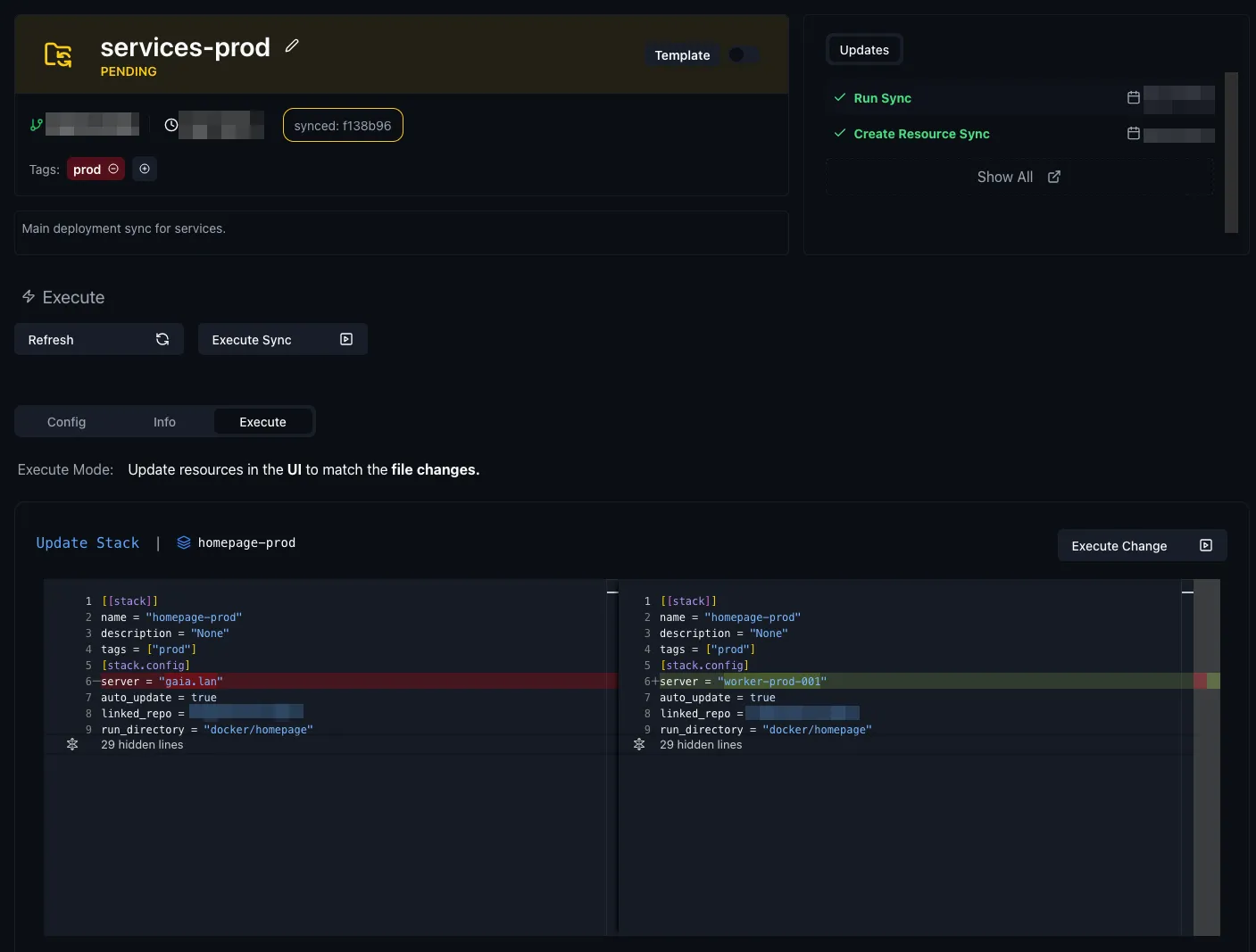
And once we apply it, we can see it reflected in the stacks:
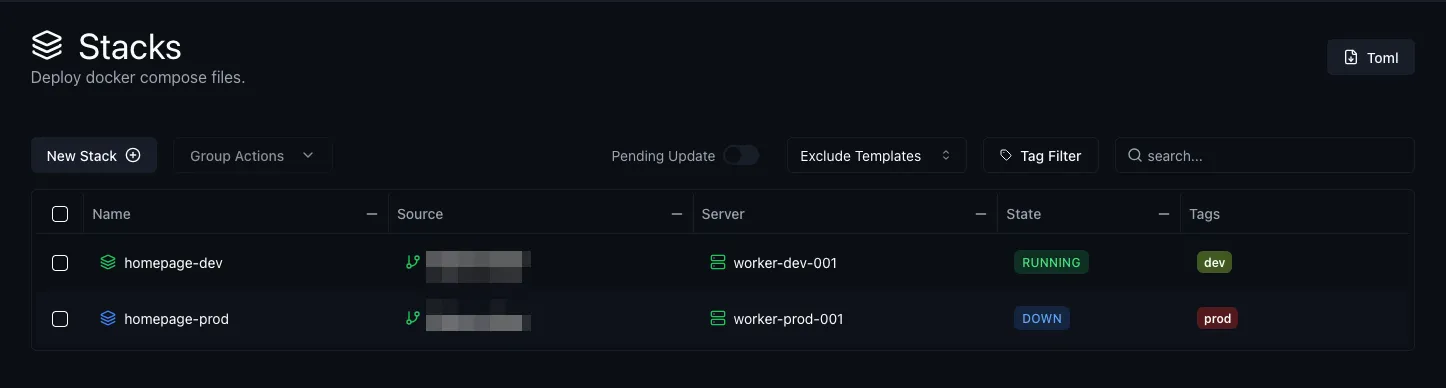
And from here, we can just redeploy it by clicking the “Redeploy” button:
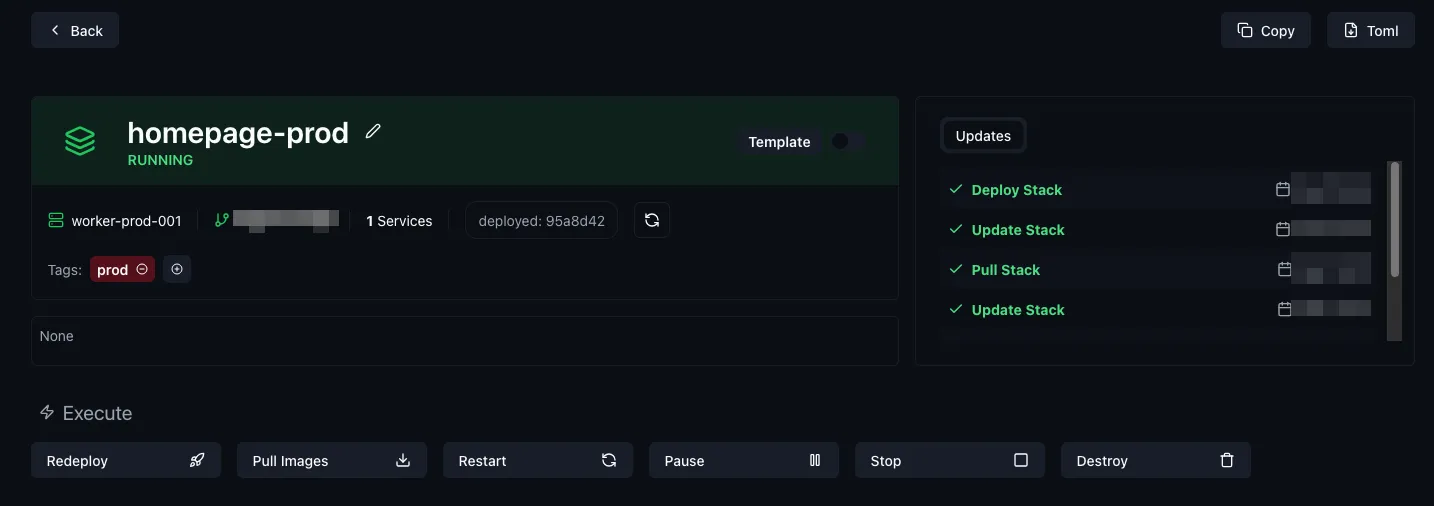
And it’s live!
That’s all there is to it - and I’m reasonably certain I could even disable the manual confirmation to deploy and fully automate it and make it “proper” CD.
Networking, dependency graphs, and future scope↑
Here’s the neat part: We can use the exact same mechanism for deploying services like traefik, meaning we could, in theory, also build dependency graphs.
For instance, immich should wait on the NAS service to be up, since it reads photos from there via nfs. Everything that uses OIDC waits on authentik. Stuff like that.
Emphasis here is on theory. I have not done this yet, am unsure if komdo can do it, but it’s on my list to play around with.
Things I glossed over↑
Amongst other things, heidrun can also:
- Parse
.gitignore’d.envfiles and handle secrets - Validate itself and all configs
- Generate a bunch more files I haven’t described here
- Support deployment on multiple nodes, something
komodocan’t (fun fact, I useheidrunto manage thekomodo-periphery-agentstacks 🐢) - Round robin my services on worker nodes
All of which pre-dates Komodo, so this all still applies.
I’m also ignoring the fact that I run my own Docker registry in-house.
Lastly, I also generally don’t deploy databases with my docker-compose stacks and just point services to an external (usually postgres) database, which makes data and service migrations between machines easier. If you don’t do this, you have to think a lot harder about state once services are running.
What this system is and isn’t↑
While I find this all very neat (and a great improvement over SSH deployments!), it’s worth calling out what this system is and isn’t.
What it is↑
- It’s a way to manage a diverse set of services
- It’s a CI/CD pipeline and server (ish, it currently doesn’t build anything, even though it can)
- It’s a monitoring and operations tool that lets me ClickOps things like service restarts
- It’s somewhat of a clustered system, but only by virtue by me manually distributing services across nodes and seeing who runs what
What it isn’t↑
Kubernetes. It’s obviously not that. It’s also not Docker Swarm. It doesn’t actually handle the underlying runner infrastructure, pod management, distributed deployments across pods, heck, it doesn’t even automatically handle single worker node assignments, since you have to hard-code that in the stack’s’ toml.
In fact, it has nothing to do with resources, other than being aware of worker nodes existing. It just runs docker-compose. And that’s a feature, not a bug.
At the same time, it’s more: It’s out-of-the-box monitoring and management (as well as the dev experience!) would require about 227 different tools for K8s. Just testing a simple Helm change can be absolute tooling nightmare (at least for me, ymmv).
Should you use it?↑
Probably? If you’ve previously done ye olde “deploy via ssh” (or have a worse system) and find that ultimately lacking, give komodo a try. I’ve been seriously impressed.
If you want a truly distributed system with all bells and whistles, by all means, go run K8s. If you don’t use K8s at work (or just very indirectly), I’d probably even suggest doing that as a learning experience. I personally get enough of that in my day job, so I appreciate the relative simplicity of this.
In either case, go build something!